cyber-posts

the P71

P71 Card/Chip Overview

The "P71" refers to NXP Semiconductors' SmartMX3 P71 series (e.g., P71D321, P71D320), a family of secure microcontrollers designed as the core chip in modern smart cards. It's one of the most widely used platforms for high-security applications, especially in identity and credential systems like yours.

In your field of certificates, identity, and credentials, the P71 is highly relevant: it's the hardware foundation for many national eID cards, ePassports, driver's licenses, health cards, and PIV-style enterprise credentials. It securely stores private keys, X.509 certificates, biometric data, and executes cryptographic operations for authentication, signing, and access control—all while resisting physical and logical attacks.

How It Works

  • Hardware Architecture
    The chip features a secure RISC CPU with dedicated crypto coprocessors (Fame3 for RSA/ECC, AES/DES engines, PUF for unique device keys, TRNG for randomness). It includes tamper-resistant sensors (light, voltage, glitch detection) and IntegralSecurity 3.0 countermeasures against side-channel and fault attacks. Memory options reach up to 500 KB non-volatile (Flash/EEPROM) for code/data, plus RAM. Dual-interface support covers contact (ISO 7816) and contactless (ISO 14443 Type A, up to 848 kbit/s).
  • Software/OS Layer
    It typically runs JCOP4 (NXP's Java Card OpenPlatform implementation): Java Card 3.0.5 Classic + GlobalPlatform 2.3. This allows multiple independent applets (e.g., one for eID authentication, one for qualified electronic signature, one for payment/EMV). Applets are post-issuance loadable and deletable in secure ways.
  • Key Security Features
    Certifications include Common Criteria EAL6+ (highest for smart card OS), EMVCo, FIPS 140-3 on some configs. It supports protocols like PACE-CAM (for contactless privacy), EAC (Extended Access Control for biometrics), BAC/SAC for ePassports.
  • Why It's Common in Identity Systems
    Governments choose it because it balances performance (<2s for ePassport SAC), large memory for multiple certs/data groups, and proven resistance to attacks. Over 7 billion SmartMX chips have shipped globally.

Here's a simplified block diagram of the architecture:

Practical Examples

Real-world cards using P71/JCOP4:

  • Many modern eID cards (e.g., Slovenian eID uses P71 with JCOP4).
  • Some fuel/loyalty cards in Africa (dual-purpose with payment + ID).
  • Enterprise PIV cards (US gov-compatible) and FIDO2 security keys.

Here are photos of actual cards built on this chip:

Quick Practical Check: Identifying a P71 Card

Most JCOP4 P71 cards return a distinctive ATR (Answer To Reset). Example from a real Slovenian eID:

3B D5 18 FF 81 91 FE 1F C3 80 73 C8 21 10 0A

You can detect it in software like this (short Python snippet using pyscard – great for testing in credential systems):

from smartcard.System import readers
from smartcard.util import toHexString

r = readers()
if not r:
    print("No reader found")
else:
    reader = r[0]
    connection = reader.createConnection()
    connection.connect()
    atr = toHexString(connection.getATR())
    print("ATR:", atr)
    # Typical P71/JCOP pattern starts with 3B ...

If you see an ATR starting with 3B … FE 45 … or similar with "JCOP" in historical bytes, it's very likely a P71-based card.

Next Step Connection
When working with certificates on these chips, you'll often deal with EF.CV certificates in the eID applet (e.g., authentication cert, signing cert, QES cert). The secure storage and on-card key generation make them ideal for verifiable credentials—private keys never leave the chip.

Let me know the next term or how this ties into your current project!

cyber-posts

TLS

SI session identifier in an authentication scheme symmetric asymmetric 1-step ake 2-step ake whatever. what is the SI??

What is SI (Session Identifier)?

In authentication and key exchange protocols (AKE = Authenticated Key Exchange), the Session Identifier (SI or commonly sid) is a value that uniquely labels a specific run of the protocol between two parties (e.g., client and server, or user and identity provider).

Its main roles are:

  • Partnering: In security proofs, it defines which two protocol executions “belong together” — they must output the same SI and the same session key to be considered correctly partnered.
  • Session management: Allows the server (or identity provider) to track or resume a session without repeating the full authentication.
  • Resumption/abbreviation: In practical systems like TLS or OpenID Connect, the SI lets a client later resume the same session (reusing cryptographic material) with a shorter handshake.
  • Logout/revocation: In identity systems, the SI can identify exactly which user session to terminate (e.g., single sign-out).

How SI is constructed – differences across schemes

  • Symmetric AKE (pre-shared key, PSK-based):
    • SI is often derived from nonces exchanged by both parties or from data inside an encrypted/authenticated message.
    • Example: In TLS-PSK or Kerberos, the session/ticket contains an identifier that both sides can compute or extract from the shared secret.
  • Asymmetric AKE (public keys, certificates):
    • SI can be explicitly chosen by one party (usually the server) and sent in clear, or derived from the transcript (all messages exchanged).
    • Classic example: TLS 1.2 – the server picks an opaque Session ID (0–32 bytes) and sends it in ServerHello.
  • 1-step (one-round) AKE:
    • Only one message is sent (often unilateral authentication).
    • SI is usually based on that single message + static identities, or a server-generated value returned in the response.
  • 2-step (two-round) AKE:
    • Both parties send messages and contribute fresh randomness.
    • SI is typically the concatenation of the two main flows (or a hash of them), ensuring both parties compute the exact same value. This gives strong partnering in security models.

In modern security models (eCK, Game-based models), the sid is formally defined as something both honest parties can compute identically from the transcript, so an adversary cannot force mismatched sessions.

Connection to your work (certificates, identity, credentials)

In systems that issue or present digital credentials:

  • The authentication phase that protects the issuance or presentation often uses an AKE under the hood (usually TLS + OpenID Connect or mutual TLS).
  • The SI (or equivalent session handle) is what lets the identity provider correlate the authenticated user with the credential issuance request, and later invalidate only that specific session if needed.

Practical part – real examples

  1. TLS 1.2 Session ID (classic explicit SI) In a Wireshark capture of a TLS 1.2 handshake, look at the Server Hello message:
    • Field: “Session ID Length” followed by the Session ID bytes (e.g., 32 random bytes chosen by the server). If the client wants to resume, it sends the same Session ID in its ClientHello, and the server can skip certificate exchange and key derivation.
  2. OpenID Connect – the “sid” claim (very common in identity systems) An ID Token issued by an OpenID Provider may contain:{ "iss": "https://idp.example.com", "sub": "user-123", "aud": "client-abc", "exp": 1735857600, "iat": 1735854000, "sid": "08a5f3c8-7d4e-4f2a-9b0e-1234567890ab" }The sid value is the session identifier at the OP. It is included in Logout Tokens so relying parties can tell the provider exactly which user session to terminate during back-channel logout.
  3. Quick code snippet – extracting Session ID from a TLS handshake (Python + ssl)import ssl import socket from ssl import SSLContext hostname = 'www.example.com' context = SSLContext(ssl.PROTOCOL_TLS_CLIENT) context.load_verify_locations('/path/to/trust/store') # or use default with socket.create_connection((hostname, 443)) as sock: with context.wrap_socket(sock, server_hostname=hostname) as ssock: # After handshake, get the session ID (TLS 1.2 style) session_id = ssock.session.id if hasattr(ssock.session, 'id') else None print("Session ID (hex):", session_id.hex() if session_id else "None (TLS 1.3 or no resumption)")Run this against a server that still supports TLS 1.2 session IDs and you’ll see the server-chosen SI printed.

Takeaway for today: Whenever you see “SI” or “sid” in protocol specs or security proofs related to authentication, it almost always means Session Identifier — the glue that ties two protocol runs together and enables resumption/management features critical to real-world identity systems.

TLS-PSK

What is TLS-PSK?

TLS-PSK (Pre-Shared Key) is a family of TLS authentication and key exchange modes that use a symmetric key shared in advance between client and server instead of (or in addition to) public-key certificates. It is a symmetric authenticated key exchange (AKE) because both parties prove possession of the same secret key, achieving mutual authentication without asymmetric cryptography in its pure form.

Key use cases in your domain (identity & credentials):

  • Constrained devices (IoT, embedded) where certificate validation is too heavy.
  • Closed ecosystems where keys can be provisioned out-of-band (e.g., device manufacturing).
  • Session resumption (very common) – a PSK derived from a previous full handshake to make subsequent connections faster and lighter.
  • Some credential issuance/presentation protocols use PSK-based channels for efficiency.

How TLS-PSK works – main variants

  1. TLS 1.2 PSK (legacy, “pure” external PSK)
    • Separate PSK cipher suites (e.g., TLS_PSK_WITH_AES_128_GCM_SHA256).
    • Client sends ClientKeyExchange containing a PSK identity (a hint, often opaque or human-readable).
    • Both sides compute the master secret as: master_secret = PRF(pre_master_secret, "master secret", client_random + server_random) where pre_master_secret is derived directly from the PSK (no Diffie-Hellman).
    • Optional: PSK can be combined with DHE/RSA for forward secrecy.
    • Symmetric authentication: the ability to derive correct finished messages proves knowledge of the PSK.
  2. TLS 1.3 PSK (modern, integrated)
    • No separate cipher suites – PSK is a key exchange mode selected in the KeyShare extension.
    • Three sub-modes:
      • PSK-only (external): Pure symmetric, no forward secrecy. Rare in practice.
      • PSK-DHE: PSK for authentication + ephemeral Diffie-Hellman for forward secrecy (recommended).
      • PSK-only (resumption): Most common real-world use – the PSK is derived from a previous full (certificate-based) handshake.
    • Handshake flow (simplified for resumption PSK-DHE):
      1. ClientHello: offers one or more pre_shared_key extensions with PSK identities (ticket or opaque binder) + a KeyShare (ephemeral DH).
      2. Server selects one PSK and sends NewSessionTicket (for future resumptions) + its own KeyShare.
      3. Both derive session keys from the PSK + DH shared secret + transcript.
    • Binders: Client includes a cryptographic binder (HMAC over transcript using the offered PSK) to prevent downgrade attacks.

Symmetric vs Asymmetric in TLS context

AspectCertificate-based (asymmetric)PSK-based (symmetric)
AuthenticationPublic keys + certificates (PKI)Shared secret key
Key distributionTrust anchors, revocation checksOut-of-band provisioning
Computational costHigher (signature verification)Lower (symmetric ops only)
Forward secrecyPossible with DHE/ECDHEOnly if combined with (ECDHE)
Typical usePublic web, general identityIoT, resumption, closed systems
Session resumptionSession ID (TLS 1.2) or ticketsPSK tickets (preferred in TLS 1.3)

Connection to Session Identifier (SI) from yesterday

In TLS-PSK resumption:

  • The PSK identity in the pre_shared_key extension acts as the session identifier.
  • For resumption tickets (most common), the identity is the opaque ticket itself (sent in clear), which the server uses to look up the encrypted PSK state.
  • This is exactly the “SI” concept: a value that uniquely identifies the session and allows the server to resume it without repeating full authentication.

Practical part – real examples you can try

  1. List current PSK-related cipher suites on a server Use OpenSSL (most Linux/macOS machines have it):openssl ciphers -v | grep -i PSKYou’ll see legacy TLS 1.2 suites like:TLS_PSK_WITH_AES_128_CBC_SHA TLSv1.2 Kx=PSK Au=PSK Enc=AES(128) Mac=SHA1In TLS 1.3, PSK is not listed as separate ciphers – it’s a mode.
  2. Force a TLS 1.3 resumption handshake with PSK (using curl) First full handshake (creates ticket), then resumption:# Full handshake (server sends ticket) curl https://example.com --tlsv1.3 --tls-max 1.3 # Subsequent call often resumes automatically if server supports tickets curl https://example.com --tlsv1.3 --tls-max 1.3 -v 2>&1 | grep "Reused.*PSK"Look for output like “Reusing existing connection... with PSK” or in verbose mode “TLSv1.3 (OUT), TLS handshake, Finished”.
  3. Wireshark view of PSK identity (resumption ticket) Capture a TLS 1.3 resumption to a site like cloudflare.com:
    • Filter: tls.handshake.type == 1 (ClientHello)
    • Expand Pre-Shared Key Extension → identities → you’ll see the opaque ticket bytes (the SI) sent in clear.

Takeaway for today: TLS-PSK is the practical symmetric AKE inside TLS, especially dominant for session resumption. When you design credential systems that run over TLS, resumption PSKs are what make repeated authentications cheap and fast, and the PSK identity/ticket is the concrete “SI” that ties sessions together.

TLS diagramThought for 33s

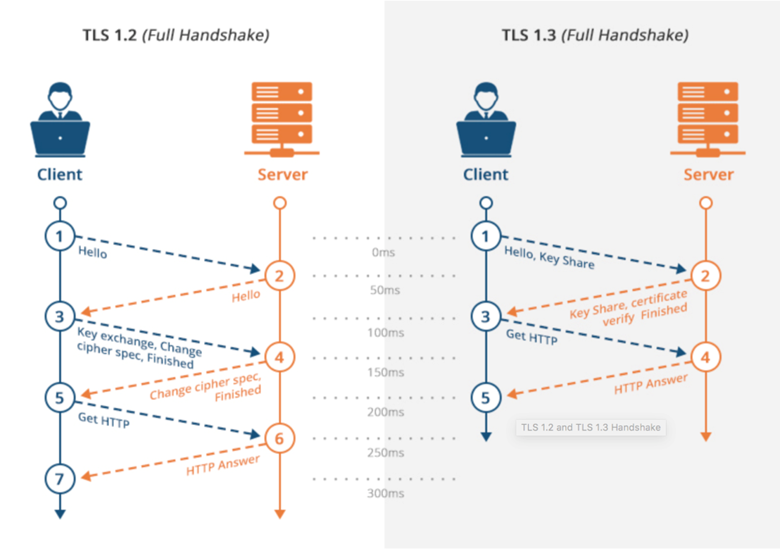
Visualizing the TLS Handshake

The TLS handshake is the core Authenticated Key Exchange (AKE) we’ve been discussing: it establishes authenticated, confidential channels, derives session keys, and enables features like session identifiers (SI) and PSK resumption.

Diagrams make the message flows (and differences between versions) much clearer than text alone.

Key points connecting to what we covered:

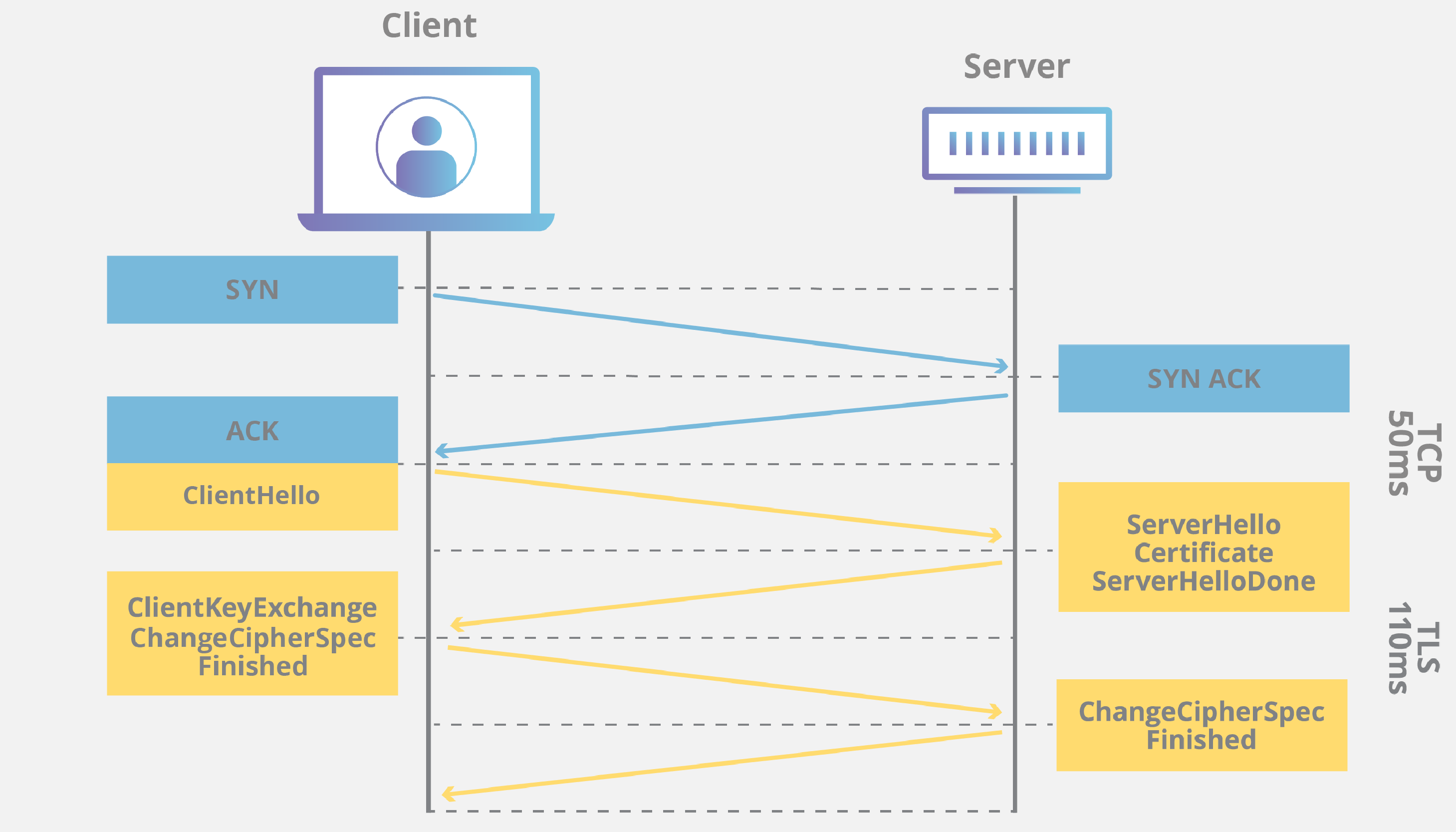
  • TLS 1.2 (legacy but still common): Multi-round (usually 2-RTT), explicit Session ID field in ServerHello for resumption (that’s the classic SI you asked about first). Resumption can abbreviate the handshake.
  • TLS 1.3 (current standard): Streamlined to 1-RTT for full handshakes, encryption starts earlier, no explicit Session ID field — instead uses opaque session tickets (sent via NewSessionTicket post-handshake) that contain an encrypted PSK for resumption. This is the modern symmetric resumption path we discussed in TLS-PSK.
  • PSK in TLS 1.3: For resumption, the client sends a pre_shared_key extension in ClientHello containing the ticket (the SI) from a prior connection. Server looks it up, both derive keys — often combined with ephemeral DH for forward secrecy. This makes repeat connections very fast (1-RTT or even 0-RTT with risks).

Here are clear, high-quality diagrams showing the flows:

Understanding HTTPS principles, SSL/TLS protocols in detail - SoByte

sobyte.net

Understanding HTTPS principles, SSL/TLS protocols in detail - SoByte

Side-by-side comparison of TLS 1.2 vs TLS 1.3 full handshakes, with real-world latency impact (notice how TLS 1.3 reduces round trips).

TCP and TLS handshake: What happens from typing in a URL to ...

medium.com

TCP and TLS handshake: What happens from typing in a URL to ...

Another clean comparison highlighting the simplified message flow in TLS 1.3.

What happens in a TLS handshake? | SSL handshake | Cloudflare

cloudflare.com

What happens in a TLS handshake? | SSL handshake | Cloudflare

Detailed TLS 1.3 handshake (certificate-based) — note how application data can flow right after the client’s Finished message (1-RTT).

How the SSL/TLS Handshake Works: A Modern Guide

linkedin.com

How the SSL/TLS Handshake Works: A Modern Guide

Modern view of TLS 1.3 emphasizing forward secrecy via ephemeral Diffie-Hellman (common in practice).

Practical part – see it yourself

To spot the SI/PSK identity in a real handshake:

  1. Install Wireshark.
  2. Capture traffic to a site like cloudflare.com (supports TLS 1.3 tickets).
  3. First visit → full handshake.
  4. Refresh quickly → look for resumption:
    • Filter: tls.handshake.type == 1 (ClientHello)
    • Expand “Extension: pre_shared_key” → you’ll see the opaque ticket bytes (the session identifier / PSK identity) sent in clear.

Or quick code check (Python, same as before but force resumption):

import ssl
import socket

hostname = 'www.cloudflare.com'
context = ssl.SSLContext(ssl.PROTOCOL_TLS_CLIENT)
context.check_hostname = False  # for demo only
context.verify_mode = ssl.CERT_NONE

with socket.create_connection((hostname, 443)) as sock:
    with context.wrap_socket(sock, server_hostname=hostname) as ssock:
        print("TLS version:", ssock.version())
        print("Cipher:", ssock.cipher())
        # On second run quickly, you'll often see resumption active

Run twice in a row — many servers will resume using PSK tickets automatically.

Takeaway for today: The handshake diagrams show exactly where authentication, key derivation, and session resumption (via SI or PSK ticket) happen — critical for any identity/credential system running over TLS.

16 sources

cyber-posts

CVC example

Example CVC from BSI TR-03110 (Public/Test Patterns)

BSI TR-03110 defines the CVC format precisely for use in ePassports (EAC) and eID systems, but BSI does not publish raw CVC test files directly on their site (they focus on test CSCA X.509 roots and interoperability guidelines). Instead, public test CVCs are widely available in open-source implementations and interoperability test suites that follow TR-03110 exactly.

These test certificates typically use the fictional country code "UT" (Utopia) or "DETEST" to avoid conflicting with production keys. They form short chains: CVCA → DV → Terminal (IS).

Libraries like EJBCA (with CVC plugin), OpenPACE, pycvc (Python), and JMRTD (Java) generate or include compliant test CVCs for developers.

Typical Parsed Test CVCA Example (Self-Signed Root)

Here is a realistic parsed example of a test CVCA CVC (based on common public test patterns from open-source TR-03110 implementations):

  • Profile Identifier (tag 0x5F29): 00 (initial profile)
  • Certificate Authority Reference (CAR) (tag 0x42): UTCVCA00001 (ASCII, identifies the issuer)
  • Public Key (tag 0x7F49): Nested TLV
  • OID: id-TA-ECDSA-SHA-256 (1.0.36.3.3.2.8.1.1.7 for brainpoolP256r1)
  • Domain parameters: BrainpoolP256r1 reference
  • Uncompressed point: 04 || X (32 bytes) || Y (32 bytes) – e.g., a test key point like 04 6B17D1F2... (full hex varies by generated key)
  • Certificate Holder Reference (CHR) (tag 0x5F20): UTCVCA00001 (same as CAR for root/self-signed)
  • Effective Date (tag 0x5F25): 100101 (YYMMDD → 2010-01-01)
  • Expiration Date (tag 0x5F24): 251231 (2025-12-31)
  • Signature (tag 0x5F37): ECDSA-SHA-256 signature (r || s, ~64 bytes)

No CHAT (0x7F4C) or extensions (0x65) in a basic CVCA.

The signed body is the raw concatenation of all TLV objects from 0x5F29 to 0x5F24. This keeps parsing simple on cards (no full ASN.1 parser needed).

Quick Comparison to X.509 (Connecting Dots)

Field/AspectX.509 (ASN.1 DER)CVC (BER-TLV)
Issuer/SubjectFull DN in complex ASN.1Short printable strings (CAR/CHR)
Public KeySubjectPublicKeyInfo with OID0x7F49 with nested OIDs and point
ValidityUTCTime fields in TBSCertificateSimple YYMMDD strings
AuthorizationExtensions (EKU, SAN)Dedicated CHAT (bitmask for roles)
Signed PortionOnly TBSCertificateAll TLVs except signature
SizeOften 500–1000+ bytesTypically 200–400 bytes (card-optimized)

CVC trades flexibility for size and parsing speed – perfect for offline verification on the chip.

Practical Part: Get and Inspect a Real Test CVC

  1. Install a library to generate/view one (10-minute task):
  • Python: pip install pycvc (implements TR-03110 fully).
  • Or clone https://github.com/frankmorgner/openpace and build cvc-print.
  1. Example with pycvc (run this to create a real test CVCA):
   from pycvc.cvc import CVCertificateBuilder, ECCurve
   from ecdsa import SigningKey, NIST256p  # Or Brainpool

   # Simple test self-signed CVCA
   sk = SigningKey.generate(curve=NIST256p)  # Use Brainpool for full TR-03110 compliance
   vk = sk.verifying_key

   builder = CVCertificateBuilder()
   builder.set_car("UTCVCA00001")
   builder.set_chr("UTCVCA00001")
   builder.set_public_key(vk)
   builder.set_effective_date("100101")
   builder.set_expiration_date("251231")

   cvc = builder.build(sk)  # Signs it
   print(cvc.to_der().hex())  # Outputs full hex of the CVC

This gives you a real DER-encoded CVC in hex. Dump it to file: with open('test_cvca.cvc', 'wb') as f: f.write(cvc.to_der())

  1. Simple TLV parser to inspect any CVC hex (extend for nested public key):
   def parse_simple_tlv(data: bytes):
       pos = 0
       fields = {}
       while pos < len(data):
           tag = data[pos]
           pos += 1
           len_byte = data[pos]
           pos += 1
           if len_byte & 0x80:  # Long form (rare in CVC)
               continue  # Skip for simplicity
           length = len_byte
           value = data[pos:pos + length]
           pos += length
           if tag == 0x42:
               fields['CAR'] = value.decode('ascii')
           elif tag == 0x5F20:
               fields['CHR'] = value.decode('ascii')
           elif tag == 0x5F25:
               fields['Effective'] = value.decode('ascii')
           elif tag == 0x5F24:
               fields['Expiration'] = value.decode('ascii')
           # Add 0x7F49 handling recursively for pubkey
       return fields

   # Use with your generated hex
   hex_cvc = "your_hex_here_without_spaces"
   print(parse_simple_tlv(bytes.fromhex(hex_cvc)))

Run the builder → get real hex → parse it. You'll see the exact fields match the example above.

This connects directly to signature verification: next time, we can add ECDSA verify on the body bytes using the public point from 0x7F49.

Spend your 10 minutes generating one with pycvc – it's the fastest way to have a real TR-03110-compliant CVC on your machine.

cyber-posts

Signatures Certificates

Digital Signatures in Certificates and Credentials: X.509 vs. CVC

Digital signatures are the core mechanism that makes certificates trustworthy in identity and credential systems. They ensure authenticity (the certificate really comes from the claimed issuer), integrity (the content hasn’t been tampered with), and non-repudiation (the issuer can’t deny having issued it).

How a Digital Signature Works (General Principle)

  1. The issuer creates the certificate data (subject identity, public key, validity dates, authorizations, etc.).
  2. This data (or a specific “to-be-signed” portion) is hashed using a cryptographic hash function (e.g., SHA-256 or SHA-3).
  3. The hash is encrypted with the issuer’s private key → this encrypted hash is the signature.
  4. The signature is attached to the certificate.
  5. To verify:
  • Compute the hash of the received certificate data.
  • Decrypt the signature using the issuer’s public key.
  • Compare the two hashes. If they match → valid signature.

This is the same fundamental process for both X.509 and CVC, but the structure, encoding, and use cases differ.

X.509 Certificates

  • Standard: ITU-T X.509 (most widely used public key certificate format).
  • Use cases in your domain: TLS/SSL server certificates, client certificates, code signing, S/MIME email, enterprise PKI for user authentication, many verifiable credential systems (when using traditional PKI).
  • Structure relevant to signatures:
  • Three main parts:
    1. TBSCertificate (To Be Signed Certificate) – contains version, serial number, issuer, subject, public key, validity, extensions, etc.
    2. signatureAlgorithm – identifies the algorithm (e.g., sha256WithRSAEncryption, ecdsa-with-SHA256).
    3. signatureValue – the actual signature bits (the encrypted hash of the TBSCertificate).
  • Encoding: ASN.1 DER (strict binary encoding).
  • Signature process:
  • Hash only the TBSCertificate (not the signature fields).
  • Sign with issuer’s private key.
  • Common algorithms: RSA-PKCS#1 v1.5, RSA-PSS, ECDSA (with NIST or Brainpool curves).
  • Libraries you’ll use: OpenSSL, Bouncy Castle, Java’s java.security.cert, Python’s cryptography or pyOpenSSL.

Card Verifiable Certificates (CVC)

  • Standard: Defined in ISO/IEC 7816-8 and BSI TR-03110 (German Federal Office for Information Security).
  • Use cases in your domain: Smart card-based identity systems, especially European eID cards, ePassports (EAC – Extended Access Control), government-issued credentials where the card itself performs verification (offline, constrained environment).
  • Key differences from X.509:
  • Designed for resource-constrained devices (smart cards).
  • Focus on role-based authorization rather than general identity.
  • Shorter chain length, often self-described references (CAR = Certificate Authority Reference, CHR = Certificate Holder Reference).
  • Structure relevant to signatures:
  • TLV (Tag-Length-Value) encoding (BER-TLV, more flexible than DER).
  • Profile Identifier, CAR, Public Key, CHR, Certificate Holder Authorization Template (CHAT – defines roles/permissions), validity dates, optional extensions, and outer signature.
  • No separate TBSCertificate block – the signature is over the entire certificate body (all fields except the signature itself).
  • Signature process:
  • Concatenate the body fields in defined order.
  • Hash and sign with issuer’s private key (almost always ECDSA for performance on cards).
  • Common curves: BrainpoolP256r1, BrainpoolP384r1, or NIST P-256.
  • Chain: Starts from a root CVCA (often linked to an X.509 CSCA), then DV (Document Verifier) certificates, then terminal/IS certificates – all in CVC format after the root.
  • Libraries/tools: Less common than X.509. Often BSI libraries, OpenSC, or custom implementations in JavaCard/GlobalPlatform environments.

Quick Comparison Table

AspectX.509CVC (Card Verifiable Certificate)
Primary UseGeneral PKI, web, enterpriseSmart cards, eID, ePassport EAC
EncodingASN.1 DER (strict)BER-TLV (flexible)
Signed DataTBSCertificate onlyEntire body except signature
Typical AlgorithmsRSA or ECDSAAlmost always ECDSA (card-friendly)
Authorization ModelExtensions (e.g., SAN, EKU)CHAT field (role-based, bitmask)
Chain LengthCan be longUsually very short (1–3 levels)
Verification LocationAnywhere (online/offline)Often on the card itself (offline)
Standard BodiesITU-T, IETF (RFC 5280)ISO/IEC 7816, BSI TR-03110

Why This Matters for Your Job

  • In identity/credential systems, you’ll often need to issue, verify, or chain both types.
  • Modern systems sometimes bridge them: an X.509 CSCA root signs a CVC chain for ePassport access control.
  • When implementing verification services, remember that CVC requires stricter parsing of TLV structures and specific OID handling.
  • Performance tip: ECDSA verification is much faster than RSA on constrained devices → prefer ECDSA when designing new credential formats.

Spend your 10 minutes today mentally walking through a verification flow: take a real client certificate (X.509) in your browser, view it, and trace the signature fields. Then look up a BSI TR-03110 example CVC (public test data exists) and compare the structure.

Next time you ask about a related topic (e.g., specific algorithms, revocation, or verifiable credentials with JSON-LD signatures), I’ll connect it back to this foundation.

Uncategorized

bash alias

Option 3: Most comfortable (long-term) – SSH key + small alias on server

  1. Set up SSH key authentication (so no password typing for SSH)On Windows (PowerShell):PowerShellssh-keygen -t ed25519 -C "your@email.com" # press enter for defaultsThen copy the public key to server:PowerShelltype $HOME\.ssh\id_ed25519.pub | ssh FLOXII@xx.xx.xxx.xx "mkdir -p ~/.ssh && cat >> ~/.ssh/authorized_keys"→ from now on ssh FLOXII@xx.xx.xxx.xx works without password
  2. Create aliases on the server (you only do this once)SSH to server:Bashssh FLOXII@xx.xx.xxx.xxThen edit ~/.bashrc:Bashnano ~/.bashrcAdd at the end:Bashalias dev='sudo docker exec -it data_tool_dev-nextjs_test-1 sh' alias dev-restart='sudo docker exec -it data_tool_dev-nextjs_test-1 sh -c "kill -SIGTERM 1 2>/dev/null || true && npm install && echo \"Starting Next.js...\" && npm start"' alias dev-logs='sudo docker logs -f data_tool_dev-nextjs_test-1'Save and reload:Bashsource ~/.bashrc
  3. Now from Windows you can run:PowerShellssh FLOXII@xx.xx.xxx.xx dev→ directly inside container (no sudo password needed if you configure sudoers — but even without it's only one password)Or restart + install in one go:PowerShellssh FLOXII@xx.xx.xxx.xx dev-restart

Uncategorized

How to Publish a NuGet Package for Your Next.js Project NPM

Publishing a NuGet package for your Next.js project lets you share reusable React components or utilities with the world (or your team). Here’s a quick guide on what a NuGet package is, why you’d want to create one, and how to publish and consume it.

What is a NuGet Package?

A NuGet package is a shareable bundle of code hosted on npmjs.com. For a Next.js project, this typically includes React UI components or utility functions, as Next.js-specific features like API routes or file-system routing can’t be packaged due to their server-side nature.

Why Create a NuGet Package?

  • Reusability: Share components or helpers across multiple projects.
  • Collaboration: Allow others to use your code via a simple npm install.
  • Versioning: Manage updates and dependencies with semantic versioning.

How to Create and Publish a NuGet Package

1. Set Up Your Project

Create a Next.js project (or use an existing one) and focus on components or utilities. For example, a library of reusable React components.

npx create-next-app@latest my-lib
cd my-lib

2. Configure package.json

Ensure your package.json has the correct metadata. The package name must include your npm scope (e.g., @yourname/mylib). Example:

{
  "name": "@flowiso/mylib",
  "version": "1.0.0",
  "main": "dist/index.js",
  "repository": {
    "type": "git",
    "url": "git+https://github.com/flowxcode/mylib.git"
  },
  "scripts": {
    "build": "tsc"
  }
}

Note: The package name (e.g., @yourname/mylib) doesn’t need to match your GitHub repo name. The repository field links to your GitHub repo for metadata.

3. Build Your Library

Use TypeScript or a bundler like Rollup to compile your code into a dist folder. For a simple setup, add a tsconfig.json and run:

npm install typescript --save-dev
npx tsc --init
npm run build

4. Log In to npm

Ensure you’re logged into npm with the correct account matching your scope:

npm login
npm whoami

Verify it returns yourname (e.g., flowiso).

5. Publish to npm

For scoped packages (e.g., @yourname/mylib), you must specify public access:

npm publish --access public

Your package is now live at npmjs.com/@yourname/mylib! 🎉

Pro Tip: Test locally before publishing to avoid version bumps:

npm pack
npm install ./yourname-mylib-1.0.0.tgz

⚠️ Next.js Limitation

You can’t package Next.js API routes or file-system routing. Stick to React components or utilities.

How to Consume Your Package

In another project, install your package:

npm install @yourname/mylib

Import and use it in your code:

import { MyComponent } from '@yourname/mylib';

my pkg

https://www.npmjs.com/settings/flowiso/packages

https://github.com/flowxcode/njs-core

Uncategorized

git screwing with my CR LF

Your tools aren’t “screwing” with your file on a whim—they’re all following their configured rules for handling line endings. The core issue is that your Git settings and your editors’ settings are misaligned. Here’s the blunt truth:

  1. Git’s Role (core.autocrlf & .gitattributes):
    • Git stores files in the repo with LF by default. On Windows, if you’ve set core.autocrlf to true, Git should convert LF to CRLF on checkout and the reverse on commit.
    • If your core.autocrlf is set to false or input, Git won’t do any conversion on checkout, so you might end up with LF files on disk even on Windows.
    • A missing or misconfigured .gitattributes file can also lead to inconsistent behavior across different systems. Without it, Git might not enforce a consistent line ending policy.
  2. Editor Behavior:
    • VS Code: It can automatically set the end-of-line sequence based on its files.eol setting. If that’s set to \n (LF), then when you save the file, VS Code will force LF—even if the file originally came in as CRLF.
    • Notepad++: It shows what’s on disk. If it’s reading CRLF, that suggests one tool somewhere is converting your LF to CRLF on disk (or vice versa). Sometimes Notepad++ might be reporting what it “expects” based on its default Windows behavior.
    • GitKraken & Visual Studio: They generally rely on Git’s configuration. So if Git is normalizing to LF internally, these tools might show LF even though the file on disk might be CRLF when inspected in another editor.
  3. What’s Happening in Your Case:
    • You see the file as CRLF in Notepad++ but as LF in your local Git checkout (and when viewed in VS Code). That’s because somewhere in your workflow Git is normalizing the file to LF (likely because the repo has LF and your Git config isn’t set to convert back to CRLF on checkout).
    • When you save the file in VS Code, it’s saved with LF (because of its settings), so Git sees a complete line-ending change compared to the version stored with CRLF on origin or on other computers. This discrepancy makes Git mark the entire file as changed.
  4. How to Fix It:
    • Align Git Settings: Check your Git config with git config --get core.autocrlf. On Windows, if you want CRLF in your working directory, set it to true. If you prefer LF everywhere, set it to input (but then you might see these differences on other Windows machines expecting CRLF).
    • Use a .gitattributes File: Create a .gitattributes file in your repo root and add rules like:pgsqlCopy*.json text eol=crlf orarduinoCopy* text=auto This forces Git to treat files the same way on all systems.
    • Synchronize Editor Settings: Ensure VS Code’s files.eol (and similar settings in other editors) matches what you want. For CRLF on Windows, set it to \r\n.

Bottom Line:
It’s not GitKraken acting on its own; it’s your configuration mismatches. Git is doing exactly what it’s been told—storing files with LF in the repo and converting on checkout based on your settings. Your editors then might override or display differently based on their own configurations. Get your Git settings and your editors in sync (using a proper .gitattributes file is often the best solution), and the headache will be over.

Fuck line endings—sort out your configs, and you’ll be golden.

thx

phase2:

Alright, listen up. If you want every damn file—every single text file—in your working copy to be CRLF, you need to force Git to treat all files as text and then tell it to check them out with CRLF line endings. But let me be clear: Git is designed to store text files normalized (LF) in the repo and only convert on checkout. There's no magic switch to store them as CRLF inside the Git objects, but your working directory can have CRLF everywhere.

Here's how to force it:

  1. Create or Edit Your .gitattributes File:
    In the root of your repo, create (or modify) a file called .gitattributes with this single line:arduinoCopy* text=auto eol=crlf This line tells Git to treat every file it can as text and, on checkout, convert line endings to CRLF.Warning: This only applies to files Git considers text. For files that Git heuristically thinks are binary, conversion won’t happen. Forcing binary files to convert is a disaster waiting to happen.
  2. Force Git to Reapply Conversion:
    If your files were already checked out before setting up your .gitattributes, Git isn’t going to magically convert them on its own. You need to force a re-checkout:bashCopygit rm --cached -r . git reset --hard This removes everything from the index and then checks them out again—now obeying your .gitattributes rules (and your core.autocrlf=true setting).
  3. Double-Check Your Editor Settings:
    • VS Code: Ensure your settings are not undoing your hard work. In your settings.json, set:jsonCopy"files.eol": "\r\n"
    • Notepad++/VS: Verify they’re not overriding the file’s CRLF status on save.
  4. Understand the Limitations:
    • Internal Repo Storage: Git will always store text files in normalized LF in its internal storage. You’ll see CRLF only in your working directory.
    • Binary Files: If there are files that are not meant to be text (like images or compiled binaries), leave them alone. Forcing a conversion on them could corrupt them.

Bottom line:
Create a .gitattributes file with * text=auto eol=crlf, force a full re-checkout, and make sure your editors are set to use CRLF. That’s the blunt truth—get your configs in sync and you’ll see CRLF everywhere you want.

smartcard world

What we know about ISD AID

In the context of JavaCard technology, ISD AID refers to the Issuer Security Domain Application Identifier.

Key Concepts:

  1. JavaCard:
    • JavaCard is a technology that allows Java-based applications (applets) to run on smart cards and similar secure devices. It provides a secure environment where applets can be executed securely, and it typically includes functionalities like cryptographic operations, secure storage, and communication protocols.
  2. AID (Application Identifier):
    • An AID is a unique identifier used to distinguish different applications (or applets) on a smart card. It's a sequence of bytes that uniquely identifies an applet on the JavaCard platform.
  3. ISD (Issuer Security Domain):
    • The Issuer Security Domain is a special applet on a JavaCard that acts as the security anchor for the card issuer. It is responsible for managing keys, loading and managing applets, and securing communications. The ISD essentially represents the card issuer's control over the card.
  4. ISD AID:
    • The ISD AID is the Application Identifier specifically assigned to the Issuer Security Domain. This AID uniquely identifies the ISD on the card and is used to route commands and manage applets securely within the JavaCard environment.

Functions of the ISD:

  • App Management: The ISD manages the lifecycle of applets on the JavaCard, including their installation, deletion, and personalization.
  • Security Management: The ISD handles the security operations of the card, such as cryptographic key management, secure messaging, and access control.
  • Communication Gateway: The ISD facilitates secure communication between the card issuer and the JavaCard, ensuring that commands are authenticated and authorized.

Importance of ISD AID:

The ISD AID is crucial because it's how the card issuer and external systems can interact with and manage the JavaCard's security domain. When deploying or managing applets, the ISD AID is used to target the ISD for specific commands, ensuring that only authorized operations are performed.

In summary, the ISD AID in JavaCard technology is the unique identifier of the Issuer Security Domain, which is central to managing the security and application lifecycle on the card.

smartcard worldUncategorized

difference between Infineon SLE 36 and SLE 78

The Infineon SLE 36 and SLE 78 series are both families of security microcontrollers designed for secure applications such as smart cards, secure identification, and access control systems. However, they differ in several key aspects:

Security Features

  • SLE 78: This series is known for its advanced security features like Integrity Guard, which provides full encryption of data paths and offers various countermeasures against physical and logical attacks.
  • SLE 36: Generally has basic security features and may not offer the advanced countermeasures against attacks that the SLE 78 series provides.

Cryptographic Support

  • SLE 78: Supports a wide range of cryptographic algorithms including RSA, ECC, DES, and AES.
  • SLE 36: Typically supports basic cryptographic algorithms like DES and 3DES but lacks the extensive cryptographic capabilities of the SLE 78 series.

Security Certification

  • SLE 78: Often certified to higher Common Criteria levels, such as CC EAL 6+, making it suitable for high-security applications.
  • SLE 36: May have some level of security certification but usually not as high as the SLE 78 series.

Processing Speed and Memory

  • SLE 78: Generally offers higher processing speeds and more memory, suitable for applications that require fast data processing and more storage.
  • SLE 36: Typically has less memory and may operate at lower speeds.

Use Cases

  • SLE 78: Because of its advanced features, it's used in high-security applications like electronic passports, secure elements in mobile devices, and secure identification cards.
  • SLE 36: More suited for lower-security applications where cost-effectiveness is a priority but some level of security is still required.

Given your background in security research, understanding these differences could be vital, especially if you're evaluating the security of systems that utilize these microcontrollers. You may find it interesting to examine the trade-offs between security features and performance or cost in these two series.

codedev pot

hot operators

https://learn.microsoft.com/en-us/dotnet/csharp/language-reference/operators/

its the power of operators, so always learn try and play

OperatorsCategory or name
x.yf(x)a[i]x?.yx?[y]x++x--x!newtypeofcheckeduncheckeddefaultnameofdelegatesizeofstackallocx->yPrimary
+x-x!x~x++x--x^x(T)xawait&x*xtrue and falseUnary
x..yRange
switchwithswitch and with expressions
x * yx / yx % yMultiplicative
x + yx – yAdditive
x << yx >> yx >>> yShift
x < yx > yx <= yx >= yisasRelational and type-testing
x == yx != yEquality
x & yBoolean logical AND or bitwise logical AND
x ^ yBoolean logical XOR or bitwise logical XOR
x | yBoolean logical OR or bitwise logical OR
x && yConditional AND
x || yConditional OR
x ?? yNull-coalescing operator
c ? t : fConditional operator
x = yx += yx -= yx *= yx /= yx %= yx &= yx |= yx ^= yx <<= yx >>= yx >>>= yx ??= y=>Assignment and lambda declaration
operators
smartcard world

APDU Lc and Le encoding

Standard ISO_IEC_7816-4-2020

https://www.iso.org/obp/ui/#iso:std:iso-iec:7816:-4:ed-4:v1:en

What we want:

  • we want to test 2 byte Le fields, that means the Lc field should give us already the info that the c r apdu pair is extended. means Lc = 00 and 2 bytes of lenght info.
  • then data, means command data,
  • then 2 bytes of Le encoded

eg. extended length apdu

00CB3FFF
04
5C02DF40
09

eg. normal length apdu

00CB3FFF
000004
5C02DF40
0009

https://stackoverflow.com/questions/40663460/use-apdu-commands-to-get-some-information-for-a-card

smartcard world

smartcard steps

creating objects AMR cmd

  • DataAccessRightTemplate
  • creating All enum values for reducing lines of code
  • object with several keys
  • diff data
  • selection of different levels gd and ad
  • exception catcher for not implemented parts
  • authentication squence more or less unclear
  • changing access rights for according hex tag hex hex

steps contd

  • remove try catch blocks
  • remove pragma directives
smartcard world

smart card encryption FAQs

see a task, pick it, and start by step 0:

IFD

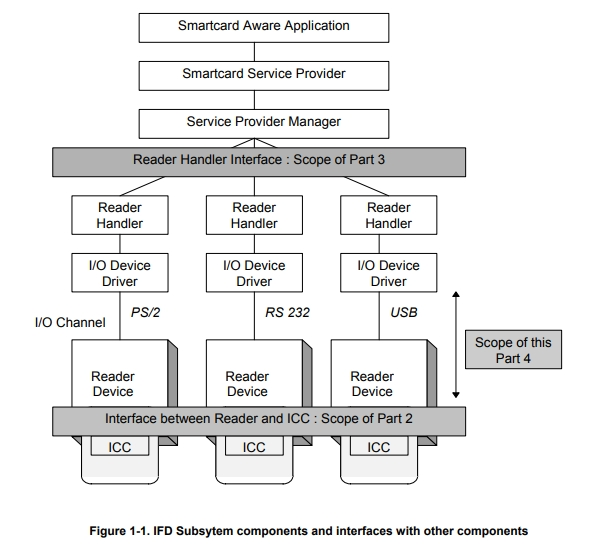
ICC Reader Device (IFD)

http://pcscworkgroup.com/Download/Specifications/pcsc4_v2.01.01.pdf

general authenticate

The GENERAL AUTHENTICATE command is used to establish a Secure Channel session, according to Secure Channel Protocol '03' described in GPCS Amendment D [Amd D].

symmetric key

ISO/IEC 11770-2:2018
https://www.iso.org/standard/73207.html

apdu

https://en.wikipedia.org/wiki/Smart_card_application_protocol_data_unit

RND

RND.IFD and RND.ICC are each 16 Bytes

A.IFD

A.IFD = RND.IFD || RND.ICC etc

Uncategorized

NUnit from scratch

https://github.com/nunit/nunit-vs-templates

same here as below, dont want to install all sorts of things extensions etc to scour through exs

https://github.com/nunit/dotnet-new-nunit
skip this, trust me, it is trash ;) and not compatible to open.

https://docs.microsoft.com/en-us/dotnet/core/testing/unit-testing-with-nunit

folllow up and self contained repo

https://github.com/flowxcode/nunit-template

according MS docs to test test the tests

https://nunit.org/nunitv2/docs/2.6.4/quickStart.html

started to debug, decided to analyse templates and MS description. building scratch project to debug and build up proper architecture

/unit-testing-using-nunit
    unit-testing-using-nunit.sln
    /PrimeService
        Source Files
        PrimeService.csproj
    /PrimeService.Tests
        Test Source Files
        PrimeService.Tests.csproj

https://docs.educationsmediagroup.com/unit-testing-csharp/nunit/lifecycle-of-a-test-fixture

Lifecycle of a test fixture

As mentioned before, NUnit gives the developer the possibility to extract all initialization and tear-down code that multiple tests might be sharing into ad-hoc methods.

Developers can take advantage of the following facilities to streamline their fixtures

  • A method decorated with a SetUp attribute will be executed before each test
  • A method decorated with a TearDown attribute will be executed after each test
  • A method decorated with a OneTimeSetUp attribute will be executed before any test is executed
  • A method decorated with a OneTimeTearDown attribute will be executed after all tests have been executed
  • The class constructor will be executed before any method and can be used to prepare fields that shouldn't be modified while executing the tests.

Additionally, developers can set up fixtures contained in a namespace and all its children by creating a class decorated with the attribute SetUpFixture. This class will be able to contain methods decorated with OneTimeSetUp and OneTimeTearDown attributes.

NUnit supports multiple SetUpFixture classes: in this case, setup methods will be executed starting from the most external namespace in and the teardown from the most internal namespace out.

nunit

References:

https://automationintesting.com/csharp/nunit/lessons/whataretestfixtures.html

Uncategorized

secure authentication

read the counter of auth attempts:

https://globalplatform.org/specs-library/card-specification-v2-3-1/

The INITIALIZE UPDATE command is used, during explicit initiation of a Secure Channel, to transmit card and session data between the card and the host. This command initiates the initiation of a Secure Channel Session.

read the counter of apdu.

findings: counter ist increasing in 2 apdu responses

https://www.rapidtables.com/convert/number/hex-to-decimal.html

https://www.scadacore.com/tools/programming-calculators/online-hex-converter/

Uncategorized

NUnit setup tmr for test setup

things tbd tmr , details tobe provided and worked out

  • SetUpAttribute is now used exclusively for per-test setup.
  • TearDownAttribute is now used exclusively for per-test teardown.
  • OneTimeSetUpAttribute is used for one-time setup per test-run. If you run n tests, this event will only occur once.
  • OneTimeTearDownAttribute is used for one-time teardown per test-run. If you run n tests, this event will only occur once
  • SetUpFixtureAttribute continues to be used as at before, but with changed method attributes.
Uncategorized

FactoryPattern adaptions real world

adapt a pattern and build a reald world ex into it

https://github.com/flowxcode/dotnet-design-patterns-samples#factory-method

https://github.com/flowxcode/dotnet-design-patterns-samples/tree/master/Generating/FactoryMethod

  1. build pattern
  2. introduce config
  3. locate point from where to read config in current project
  4. read config early and compare in diagrams

the factory pattern:

https://dotnetcoretutorials.com/2019/10/15/the-factory-pattern-in-net-core/

TestFixtureContextBase.cs
DeviceMapper -> gets a new DeviceFactory creates Devices , Devices inherit from Device class.

Uncategorized

.dll Type Library Importer Tlbimp.exe and Tlbexp.exe

wanted to add AwUsbApi.dll lib but got

trying to validate dlls

https://stackoverflow.com/questions/3456758/a-reference-to-the-dll-could-not-be-added

using VS Developer Command Prompt

https://docs.microsoft.com/en-us/visualstudio/ide/reference/command-prompt-powershell?view=vs-2022

C:\Program Files\Digi\AnywhereUSB\Advanced>tlbimp AwUsbApi.dll
Microsoft (R) .NET Framework Type Library to Assembly Converter 4.8.3928.0
Copyright (C) Microsoft Corporation.  All rights reserved.

TlbImp : error TI1002 : The input file 'C:\Program Files\Digi\AnywhereUSB\Advanced\AwUsbApi.dll' is not a valid type library.

C:\Program Files\Digi\AnywhereUSB\Advanced>Tlbexp AwUsbApi.dll
Microsoft (R) .NET Framework Assembly to Type Library Converter 4.8.3928.0
Copyright (C) Microsoft Corporation.  All rights reserved.

TlbExp : error TX0000 : Could not load file or assembly 'file:///C:\Program Files\Digi\AnywhereUSB\Advanced\AwUsbApi.dll' or one of its dependencies. The module was expected to contain an assembly manifest.

ist not the first problem. already encountered on digi forum

https://www.digi.com/support/forum/27954/problems-with-awusbapi-dll

Uncategorized

string empty or “”

one pretty fundamental answer:

c stackoverflow:

There really is no difference from a performance and code generated standpoint. In performance testing, they went back and forth between which one was faster vs the other, and only by milliseconds.

In looking at the behind the scenes code, you really don't see any difference either. The only difference is in the IL, which string.Empty use the opcode ldsfld and "" uses the opcode ldstr, but that is only because string.Empty is static, and both instructions do the same thing. If you look at the assembly that is produced, it is exactly the same.

C# Code

private void Test1()
{
    string test1 = string.Empty;    
    string test11 = test1;
}

private void Test2()
{
    string test2 = "";    
    string test22 = test2;
}

IL Code

.method private hidebysig instance void 
          Test1() cil managed
{
  // Code size       10 (0xa)
  .maxstack  1
  .locals init ([0] string test1,
                [1] string test11)
  IL_0000:  nop
  IL_0001:  ldsfld     string [mscorlib]System.String::Empty
  IL_0006:  stloc.0
  IL_0007:  ldloc.0
  IL_0008:  stloc.1
  IL_0009:  ret
} // end of method Form1::Test1
.method private hidebysig instance void 
        Test2() cil managed
{
  // Code size       10 (0xa)
  .maxstack  1
  .locals init ([0] string test2,
                [1] string test22)
  IL_0000:  nop
  IL_0001:  ldstr      ""
  IL_0006:  stloc.0
  IL_0007:  ldloc.0
  IL_0008:  stloc.1
  IL_0009:  ret
} // end of method Form1::Test2

Assembly code

        string test1 = string.Empty;
0000003a  mov         eax,dword ptr ds:[022A102Ch] 
0000003f  mov         dword ptr [ebp-40h],eax 

        string test11 = test1;
00000042  mov         eax,dword ptr [ebp-40h] 
00000045  mov         dword ptr [ebp-44h],eax 
        string test2 = "";
0000003a  mov         eax,dword ptr ds:[022A202Ch] 
00000040  mov         dword ptr [ebp-40h],eax 

        string test22 = test2;
00000043  mov         eax,dword ptr [ebp-40h] 
00000046  mov         dword ptr [ebp-44h],eax 

https://stackoverflow.com/a/1588678/1650038

Uncategorized

COMException

System.Runtime.InteropServices.COMException (0x800703FA): Retrieving the COM class factory for component with CLSID {82EAAE85-00A5-4FE1-8BA7-8DBBACCC6BEA} failed due to the following error: 800703fa Illegal operation attempted on a registry key that has been marked for deletion. (0x800703FA).
at System.RuntimeTypeHandle.AllocateComObject(Void* pClassFactory)
at System.RuntimeType.CreateInstanceDefaultCtor(Boolean publicOnly, Boolean wrapExceptions)
at System.Activator.CreateInstance(Type type, Boolean nonPublic, Boolean wrapExceptions)
at System.Activator.CreateInstance(Type type)
at ...

Solution

moved instance into ctor

public KeoObj()
{
  _proxiLab = (IProxiLAB)Activator.CreateInstance(Type.GetTypeFromProgID("KEOLABS.ProxiLAB"));
}

always a charm, clean code:

https://methodpoet.com/clean-code/

possible relevance:

https://stackoverflow.com/questions/21941216/using-application-pool-identity-results-in-exceptions-and-event-logs

link base:

http://adopenstatic.com/cs/blogs/ken/archive/2008/01/29/15759.aspx

Uncategorized

the AMR command

section 4.5.1, APPLICATION MANAGEMENT REQUEST (AMR) Command

https://globalplatform.org/wp-content/uploads/2014/03/GPC_ISO_Framework_v1.0.pdf

ideas tear and check and repeat.

run multiple parameterized tests with NUnit as in:

https://www.lambdatest.com/blog/nunit-parameterized-test-examples/

        [Test]
        [TestCase("chrome", "72.0", "Windows 10")]
        [TestCase("internet explorer", "11.0", "Windows 10")]
        [TestCase("Safari", "11.0", "macOS High Sierra")]
        [TestCase("MicrosoftEdge", "18.0", "Windows 10")]
        [Parallelizable(ParallelScope.All)]
        public void DuckDuckGo_TestCase_Demo(String browser, String version, String os)
        {
            String username = "user-name";
            String accesskey = "access-key";
            String gridURL = "@hub.lambdatest.com/wd/hub";