Category: Uncategorized

Uncategorized

conda jupyter tensorflow

found on #stackoverflow
https://stackoverflow.com/a/43259471/1650038

Create a virtual environment - conda create -n tensorflowx

  • conda activate tensorflowx

So then the next thing, when you launch it:

  1. If you are not inside the virtual environment type - Source Activate Tensorflow
  2. Then inside this again install your Jupiter notebook and Pandas libraries, because there can be some missing in this virtual environment

Inside the virtual environment just type:

  1. pip install jupyter notebook
  2. pip install pandas

Then you can launch jupyter notebook saying:

  1. jupyter notebook
  2. Select the correct terminal python 3 or 2
  3. Then import those modules

! start jupy from project folder in Documents

.py files

git init
add commit
git remote add origin  <REMOTE_URL> 
git push remot origin

conda jupyter tensorflow: github condjup is local xfold repo
vs code debug tensorflo: repo deepflo
docker tensorflow image: once again:
docker run -it --rm -v $(realpath ~/notebooks):/tf/notebooks -p 8888:8888 tensorflow/tensorflow:latest-jupyter
https://codeflysurf.com/2021/11/22/running-tensorflow-in-jupyter-notebook-docker/
Uncategorized

A Simple MNIST Example

data analysis and vis in jupyter nb

https://jupyter.org/try
https://hub.gke2.mybinder.org/user/ipython-ipython-in-depth-9if5hwc5/notebooks/binder/Index.ipynb

import tensorflow as tf
print(tf.__version__)

# Load and prepare data, convert labels to one-hot encoding

mnist= tf.keras.datasets.mnist
(x_train, y_train), (x_test, y_test) = mnist.load_data()
x_train, x_test= x_train/ 255.0, x_test/ 255.0
y_train= tf.keras.utils.to_categorical(y_train, num_classes=10)
y_test= tf.keras.utils.to_categorical(y_test, num_classes=10)

# Configure the model layers
model = tf.keras.models.Sequential()
model.add(tf.keras.layers.Flatten(input_shape=(28, 28)))
model.add(tf.keras.layers.Dense(100, activation='relu'))
model.add(tf.keras.layers.Dense(50, activation='relu'))
model.add(tf.keras.layers.Dense(10, activation='softmax'))
model.summary()

# Configure the model training procedure
model.compile(optimizer=tf.keras.optimizers.SGD(lr=0.01, momentum=0.9),
  loss=tf.keras.losses.CategoricalCrossentropy(from_logits=False),
  metrics=['accuracy'])
model.fit(x_train, y_train, epochs=20, batch_size=64, validation_split=0.2)
model.evaluate(x_test, y_test, batch_size=64)

Uncategorized

tensorflow pipenv keras

https://github.com/flowxcode/deepflow
https://pipenv.pypa.io/en/latest/
https://pipenv.pypa.io/en/latest/install/

$ pipenv run python main.py

$ pipenv shell

https://stackoverflow.com/a/68673872/1650038

settings.json to pipvenv in home .local

"python.pythonPath": "${env:HOME}/.local/share/virtualenvs/deepflow-eho_wYiM/bin/python"

launch.json

{
    // Use IntelliSense to learn about possible attributes.
    // Hover to view descriptions of existing attributes.
    // For more information, visit: https://go.microsoft.com/fwlink/?linkid=830387
    "version": "0.2.0",
    "configurations": [
        {
            "name": "Python: Current File",
            "type": "python",
            "request": "launch",
            "program": "${file}",
            "console": "integratedTerminal",
            //"program": "/home/linx/.local/share/virtualenvs/deepflow-eho_wYiM/<program>",
        }
    ]
}

test x format

import tensorflow as tf
print("TensorFlow version:", tf.__version__)

Uncategorized

the path to neural networks on flask python

https://towardsdatascience.com/a-financial-neural-network-for-quants-45ec0aaef73c

conda init
conda config --set auto_activate_base false
pip install notebook
cd /your/project/root/directory/
jupyter notebook 

code left

c right

!! dont forget about requirements.txt

https://towardsdatascience.com/activation-functions-neural-networks-1cbd9f8d91d6

https://www.datacamp.com/community/tutorials/lstm-python-stock-market

Uncategorized

virtual env python

different projects, different requirements different envs:
create your virtual environment

python3 -m venv tutorial-env
python -m venv venv
$ . venv/bin/activate

https://docs.python.org/3/tutorial/venv.html

add it in your git repo, .gitignore

echo "venv" >> .gitignore
create requirements.txt:
pip freeze > requirements.txt
git add requirements.txt

https://medium.com/wealthy-bytes/the-easiest-way-to-use-a-python-virtual-environment-with-git-401e07c39cde

pip install -r requirements.txt

https://boscacci.medium.com/why-and-how-to-make-a-requirements-txt-f329c685181e

tia

Uncategorized

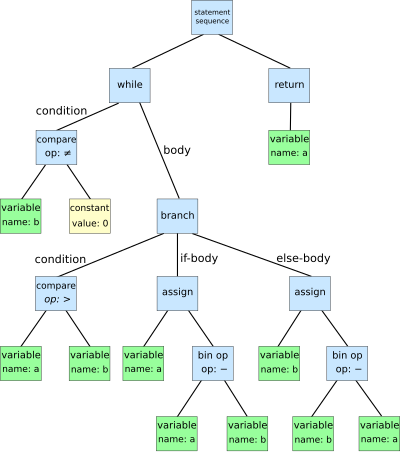
AST LHS RHS

https://www.codementor.io/@erikeidt/overview-of-a-compiler-zayyljs2s#evalutation-context-lhs-rhs-branch

https://en.wikipedia.org/wiki/Abstract_syntax_tree

https://en.wikipedia.org/wiki/Parse_tree

citation:

Left Hand Side vs. Right Hand Side

For example, in a = b + c, we evaluate the value of b and c, add them together, and then associate or store the result in a.  Here b and c have the context that we call right hand side — b and c are on the right hand side (of an assignment), whereas a has left hand side context — a is on the left hand side of an assignment.  We need the value of b and c yet the location of a to store the result.

A complex left hand side expression will itself also involve some right hand side evaluation.  For example, a[i] = 5 requires evaluting a and i as values (as if right hand side) and only the array indexing itself is evalutated as left hand side (for storage location).  5, of course, is understood as right hand side.